本文译自 openai/openai-cookbook 仓库 examples/codex/build_code_review_with_codex_sdk.md(commit f581907),原文:examples/codex/build_code_review_with_codex_sdk.md @ f581907;许可:MIT License;版权声明:Copyright (c) 2025 OpenAI;修改说明:翻译为中文并调整排版,代码块保持原样。MIT 许可全文见来源与许可。
用 Codex SDK 构建代码审查
归档示例——使用这些工作流前,请先阅读当前的 CI 指南。 下面的 GitHub 示例把 API 与仓库令牌暴露给整个作业,并把代码审查与拉取请求写权限放在一起。不要照搬这种凭据与权限布局;只读沙箱本身并不能保护密钥。请使用当前的 Codex GitHub Action 工作流与安全检查清单,它把审查与发布反馈分开。其他 CI 系统请遵循自动化认证指南。
借助 Codex Cloud 中的代码审查,你可以把团队托管在云端的 GitHub 仓库连接到 Codex,并在每个 PR 上获得自动审查。但如果代码托管在本地,或者你使用的不是 GitHub 这类代码托管平台呢?
好在我们可以用自己的 CI/CD runner 复现 Codex 的云端审查流程。本指南会用 Codex CLI 的无头模式,在 GitHub Actions、GitLab CI/CD、Azure DevOps Pipelines 与 Jenkins 中搭建自己的代码审查动作。
模型建议:在这些工作流中使用 gpt-5.5,以获得最强的审查准确性与一致性。
搭建自己的代码审查,大致按以下步骤进行:
- 在 CI/CD runner 中安装 Codex CLI
- 用无头(exec)模式运行 Codex,并使用 CLI 自带的代码审查提示词
- 为 Codex 指定结构化的 JSON 输出 schema
- 解析 JSON 结果,调用代码托管平台的 API 创建审查评论
实现后,Codex 就能留下行内审查评论:
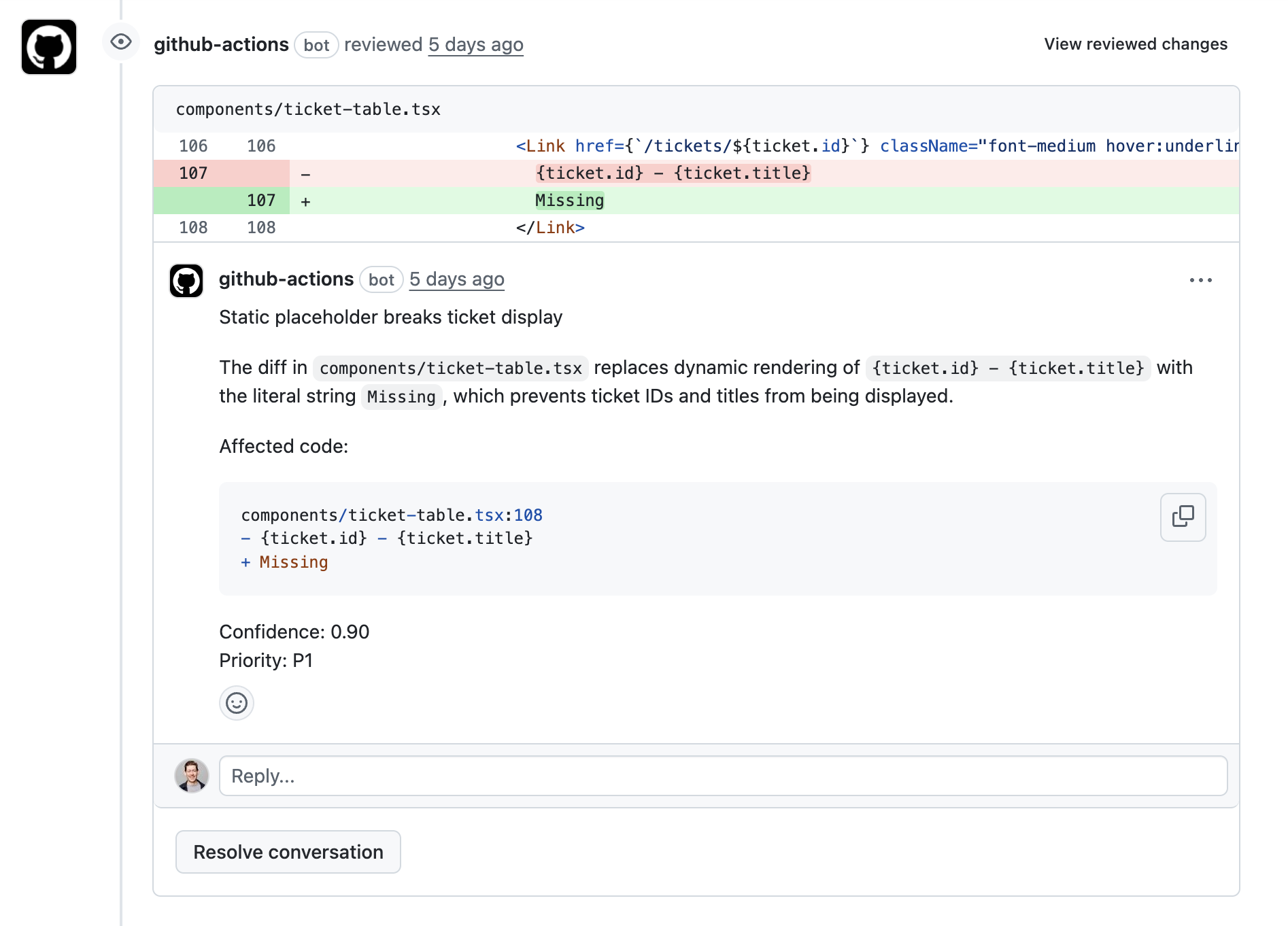
代码审查提示词
对于 Codex 中的复杂编码工作流,推荐使用 GPT-5.5。可以用下面的提示词引导 GPT-5.5 进行代码审查:
You are acting as a reviewer for a proposed code change made by another engineer.
Focus on issues that impact correctness, performance, security, maintainability, or developer experience.
Flag only actionable issues introduced by the pull request.
When you flag an issue, provide a short, direct explanation and cite the affected file and line range.
Prioritize severe issues and avoid nit-level comments unless they block understanding of the diff.
After listing findings, produce an overall correctness verdict (\"patch is correct\" or \"patch is incorrect\") with a concise justification and a confidence score between 0 and 1.
Ensure that file citations and line numbers are exactly correct using the tools available; if they are incorrect your comments will be rejected.
Codex 结构化输出
为了在拉取请求的代码行范围上留下评论,我们需要让 Codex 按特定格式返回结果。为此可以创建 codex-output-schema.json,遵循 OpenAI 的结构化输出格式。
在工作流 YAML 中使用这个文件时,可以这样调用 Codex,传入 output-schema-file 参数:
- name: Run Codex structured review
        id: run-codex
        uses: openai/codex-action@main
        with:
            openai-api-key: ${{ secrets.OPENAI_API_KEY }}
            prompt-file: codex-prompt.md
            sandbox: read-only
            model: ${{ env.CODEX_MODEL }}
            output-schema-file: codex-output-schema.json # <-- Our schema file
            output-file: codex-output.json
也可以给 codex exec 传入类似参数,例如:
codex exec "Review my pull request!" --output-schema codex-output-schema.jsonGitHub Actions 示例
把各部分拼起来。如果你在本地环境使用 GitHub Actions,可以按自己的流程调整这个示例。行内注释标出了关键步骤。
name: Codex Code Review

# Determine when the review action should be run:
on:
  pull_request:
    types:
      - opened
      - reopened
      - synchronize
      - ready_for_review

concurrency:
  group: codex-structured-review-${{ github.event.pull_request.number }}
  cancel-in-progress: true

jobs:
  codex-structured-review:
    name: Run Codex structured review
    runs-on: ubuntu-latest
    permissions:
      contents: read
      pull-requests: write
    env:
      OPENAI_API_KEY: ${{ secrets.OPENAI_API_KEY }}
      GITHUB_TOKEN: ${{ github.token }}
      CODEX_MODEL: ${{ vars.CODEX_MODEL || 'gpt-5.5' }}
      PR_NUMBER: ${{ github.event.pull_request.number }}
      HEAD_SHA: ${{ github.event.pull_request.head.sha }}
      BASE_SHA: ${{ github.event.pull_request.base.sha }}
      REPOSITORY: ${{ github.repository }}
    outputs:
      codex-output: ${{ steps.run-codex.outputs.final-message }}
    steps:
      - name: Checkout pull request merge commit
        uses: actions/checkout@v5
        with:
          ref: refs/pull/${{ github.event.pull_request.number }}/merge

      - name: Fetch base and head refs
        run: |
          set -euxo pipefail
          git fetch --no-tags origin \
            "${{ github.event.pull_request.base.ref }}" \
            +refs/pull/${{ github.event.pull_request.number }}/head
        shell: bash

      # The structured output schema ensures that codex produces comments
      # with filepaths, line numbers, title, body, etc.
      - name: Generate structured output schema
        run: |
          set -euo pipefail
          cat <<'JSON' > codex-output-schema.json
          {
              "type": "object",
              "properties": {
                "findings": {
                  "type": "array",
                  "items": {
                    "type": "object",
                    "properties": {
                      "title": {
                        "type": "string",
                        "maxLength": 80
                      },
                      "body": {
                        "type": "string",
                        "minLength": 1
                      },
                      "confidence_score": {
                        "type": "number",
                        "minimum": 0,
                        "maximum": 1
                      },
                      "priority": {
                        "type": "integer",
                        "minimum": 0,
                        "maximum": 3
                      },
                      "code_location": {
                        "type": "object",
                        "properties": {
                          "absolute_file_path": {
                            "type": "string",
                            "minLength": 1
                          },
                          "line_range": {
                            "type": "object",
                            "properties": {
                              "start": {
                                "type": "integer",
                                "minimum": 1
                              },
                              "end": {
                                "type": "integer",
                                "minimum": 1
                              }
                            },
                            "required": [
                              "start",
                              "end"
                            ],
                            "additionalProperties": false
                          }
                        },
                        "required": [
                          "absolute_file_path",
                          "line_range"
                        ],
                        "additionalProperties": false
                      }
                    },
                    "required": [
                      "title",
                      "body",
                      "confidence_score",
                      "priority",
                      "code_location"
                    ],
                    "additionalProperties": false
                  }
                },
                "overall_correctness": {
                  "type": "string",
                  "enum": [
                    "patch is correct",
                    "patch is incorrect"
                  ]
                },
                "overall_explanation": {
                  "type": "string",
                  "minLength": 1
                },
                "overall_confidence_score": {
                  "type": "number",
                  "minimum": 0,
                  "maximum": 1
                }
              },
              "required": [
                "findings",
                "overall_correctness",
                "overall_explanation",
                "overall_confidence_score"
              ],
              "additionalProperties": false
            }
          JSON
        shell: bash

      # This section generates our prompt:
      - name: Build Codex review prompt
        env:
          REVIEW_PROMPT_PATH: ${{ vars.CODEX_PROMPT_PATH || 'review_prompt.md' }}
        run: |
          set -euo pipefail
          PROMPT_PATH="codex-prompt.md"
          TEMPLATE_PATH="${REVIEW_PROMPT_PATH}"

          if [ -n "$TEMPLATE_PATH" ] && [ -f "$TEMPLATE_PATH" ]; then
            cat "$TEMPLATE_PATH" > "$PROMPT_PATH"
          else
            {
              printf '%s\n' "You are acting as a reviewer for a proposed code change made by another engineer."
              printf '%s\n' "Focus on issues that impact correctness, performance, security, maintainability, or developer experience."
              printf '%s\n' "Flag only actionable issues introduced by the pull request."
              printf '%s\n' "When you flag an issue, provide a short, direct explanation and cite the affected file and line range."
              printf '%s\n' "Prioritize severe issues and avoid nit-level comments unless they block understanding of the diff."
              printf '%s\n' "After listing findings, produce an overall correctness verdict (\"patch is correct\" or \"patch is incorrect\") with a concise justification and a confidence score between 0 and 1."
              printf '%s\n' "Ensure that file citations and line numbers are exactly correct using the tools available; if they are incorrect your comments will be rejected."
            } > "$PROMPT_PATH"
          fi

          {
            echo ""
            echo "Repository: ${REPOSITORY}"
            echo "Pull Request #: ${PR_NUMBER}"
            echo "Base ref: ${{ github.event.pull_request.base.ref }}"
            echo "Head ref: ${{ github.event.pull_request.head.ref }}"
            echo "Base SHA: ${BASE_SHA}"
            echo "Head SHA: ${HEAD_SHA}"
            echo "Changed files:"
            git --no-pager diff --name-status "${BASE_SHA}" "${HEAD_SHA}"
            echo ""
            echo "Unified diff (context=5):"
            git --no-pager diff --unified=5 --stat=200 "${BASE_SHA}" "${HEAD_SHA}" > /tmp/diffstat.txt
            git --no-pager diff --unified=5 "${BASE_SHA}" "${HEAD_SHA}" > /tmp/full.diff
            cat /tmp/diffstat.txt
            echo ""
            cat /tmp/full.diff
          } >> "$PROMPT_PATH"
        shell: bash

      # Putting it all together: we run the codex action with our code review prompt,
      # structured output, and output file:
      - name: Run Codex structured review
        id: run-codex
        uses: openai/codex-action@main
        with:
          openai-api-key: ${{ secrets.OPENAI_API_KEY }}
          prompt-file: codex-prompt.md
          output-schema-file: codex-output-schema.json
          output-file: codex-output.json
          sandbox: read-only
          model: ${{ env.CODEX_MODEL }}

      - name: Inspect structured Codex output
        if: ${{ always() }}
        run: |
          if [ -s codex-output.json ]; then
            jq '.' codex-output.json || true
          else
            echo "Codex output file missing"
          fi
        shell: bash

      # This step produces in-line code review comments on specific line
      # ranges of code.
      - name: Publish inline review comments
        if: ${{ always() }}
        env:
          REVIEW_JSON: codex-output.json
        run: |
          set -euo pipefail
          if [ ! -s "$REVIEW_JSON" ]; then
            echo "No Codex output file present; skipping comment publishing."
            exit 0
          fi
          findings_count=$(jq '.findings | length' "$REVIEW_JSON")
          if [ "$findings_count" -eq 0 ]; then
            echo "Codex returned no findings; skipping inline comments."
            exit 0
          fi
          jq -c --arg commit "$HEAD_SHA" '.findings[] | {
              body: (.title + "\n\n" + .body + "\n\nConfidence: " + (.confidence_score | tostring) + (if has("priority") then "\nPriority: P" + (.priority | tostring) else "" end)),
              commit_id: $commit,
              path: .code_location.absolute_file_path,
              line: .code_location.line_range.end,
              side: "RIGHT",
              start_line: (if .code_location.line_range.start != .code_location.line_range.end then .code_location.line_range.start else null end),
              start_side: (if .code_location.line_range.start != .code_location.line_range.end then "RIGHT" else null end)
            } | with_entries(select(.value != null))' "$REVIEW_JSON" > findings.jsonl
          while IFS= read -r payload; do
            echo "Posting review comment payload:" && echo "$payload" | jq '.'
            curl -sS \
              -X POST \
              -H "Accept: application/vnd.github+json" \
              -H "Authorization: Bearer ${GITHUB_TOKEN}" \
              -H "X-GitHub-Api-Version: 2022-11-28" \
              "https://api.github.com/repos/${REPOSITORY}/pulls/${PR_NUMBER}/comments" \
              -d "$payload"
          done < findings.jsonl
        shell: bash

      # This section creates a single comment summarizing the review.
      - name: Publish overall summary comment
        if: ${{ always() }}
        env:
          REVIEW_JSON: codex-output.json
        run: |
          set -euo pipefail
          if [ ! -s "$REVIEW_JSON" ]; then
            echo "Codex output missing; skipping summary."
            exit 0
          fi
          overall_state=$(jq -r '.overall_correctness' "$REVIEW_JSON")
          overall_body=$(jq -r '.overall_explanation' "$REVIEW_JSON")
          confidence=$(jq -r '.overall_confidence_score' "$REVIEW_JSON")
          msg="**Codex automated review**\n\nVerdict: ${overall_state}\nConfidence: ${confidence}\n\n${overall_body}"
          curl -sS \
            -X POST \
            -H "Accept: application/vnd.github+json" \
            -H "Authorization: Bearer ${GITHUB_TOKEN}" \
            -H "X-GitHub-Api-Version: 2022-11-28" \
            "https://api.github.com/repos/${REPOSITORY}/issues/${PR_NUMBER}/comments" \
            -d "$(jq -n --arg body "$msg" '{body: $body}')"
        shell: bash
GitLab 示例
GitLab 没有与 GitHub Action 直接对应的机制,但你可以在 GitLab CI/CD 中运行 codex exec 来做自动代码审查。
不过,GitHub Action 包含一项重要的安全策略:它丢弃 sudo 权限,使 Codex 无法读取自己的 OpenAI API 密钥。这种隔离很关键,尤其是在公开仓库中,因为那里可能存在敏感密钥;它可以防止 Codex 在执行期间读取或外泄凭据。运行这个作业前,请先配置 GitLab 项目:
- 进入 Project → Settings → CI/CD。
- 展开 Variables 区域。
- 添加
OPENAI_API_KEY与GITLAB_TOKEN。 - 根据需要把它们标记为 masked/protected。
- 把下面的 GitLab 示例作业加入仓库根目录的
.gitlab-ci.yml,让它在合并请求流水线中运行。
在公开仓库中使用 API 密钥时要格外小心。
stages:
  - review

codex-structured-review:
  stage: review
  image: ubuntu:22.04
  rules:
    - if: '$CI_PIPELINE_SOURCE == "merge_request_event"'
  variables:
    PR_NUMBER: $CI_MERGE_REQUEST_IID
    REPOSITORY: "$CI_PROJECT_PATH"
    BASE_SHA: "$CI_MERGE_REQUEST_DIFF_BASE_SHA"
    HEAD_SHA: "$CI_COMMIT_SHA"

  before_script:
    - apt-get update -y
    - apt-get install -y git curl jq
    - |
      if ! command -v codex >/dev/null 2>&1; then
        ARCH="$(uname -m)"
        case "$ARCH" in
          x86_64) CODEX_PLATFORM="x86_64-unknown-linux-musl" ;;
          aarch64|arm64) CODEX_PLATFORM="aarch64-unknown-linux-musl" ;;
          *)
            echo "Unsupported architecture: $ARCH"
            exit 1
            ;;
        esac

        CODEX_VERSION="${CODEX_VERSION:-latest}"
        if [ -n "${CODEX_DOWNLOAD_URL:-}" ]; then
          CODEX_URL="$CODEX_DOWNLOAD_URL"
        elif [ "$CODEX_VERSION" = "latest" ]; then
          CODEX_URL="https://github.com/openai/codex/releases/latest/download/codex-${CODEX_PLATFORM}.tar.gz"
        else
          CODEX_URL="https://github.com/openai/codex/releases/download/${CODEX_VERSION}/codex-${CODEX_PLATFORM}.tar.gz"
        fi

        TMP_DIR="$(mktemp -d)"
        curl -fsSL "$CODEX_URL" -o "$TMP_DIR/codex.tar.gz"
        tar -xzf "$TMP_DIR/codex.tar.gz" -C "$TMP_DIR"
        install -m 0755 "$TMP_DIR"/codex-* /usr/local/bin/codex
        rm -rf "$TMP_DIR"
      fi
    - git fetch origin $CI_MERGE_REQUEST_TARGET_BRANCH_NAME
    - git fetch origin $CI_MERGE_REQUEST_SOURCE_BRANCH_NAME
    - git checkout $CI_MERGE_REQUEST_SOURCE_BRANCH_NAME

  script:
    - echo "Running Codex structured review for MR !${PR_NUMBER}"

    # Generate structured output schema
    - |
      cat <<'JSON' > codex-output-schema.json
      {
        "$schema": "http://json-schema.org/draft-07/schema#",
        "title": "Codex Structured Review",
        "type": "object",
        "additionalProperties": false,
        "required": [
          "overall_correctness",
          "overall_explanation",
          "overall_confidence_score",
          "findings"
        ],
        "properties": {
          "overall_correctness": {
            "type": "string",
            "description": "Overall verdict for the merge request."
          },
          "overall_explanation": {
            "type": "string",
            "description": "Explanation backing up the verdict."
          },
          "overall_confidence_score": {
            "type": "number",
            "minimum": 0,
            "maximum": 1,
            "description": "Confidence level for the verdict."
          },
          "findings": {
            "type": "array",
            "description": "Collection of actionable review findings.",
            "items": {
              "type": "object",
              "additionalProperties": false,
              "required": [
                "title",
                "body",
                "confidence_score",
                "code_location"
              ],
              "properties": {
                "title": {
                  "type": "string"
                },
                "body": {
                  "type": "string"
                },
                "confidence_score": {
                  "type": "number",
                  "minimum": 0,
                  "maximum": 1
                },
                "code_location": {
                  "type": "object",
                  "additionalProperties": false,
                  "required": [
                    "absolute_file_path",
                    "relative_file_path",
                    "line_range"
                  ],
                  "properties": {
                    "absolute_file_path": {
                      "type": "string"
                    },
                    "relative_file_path": {
                      "type": "string"
                    },
                    "line_range": {
                      "type": "object",
                      "additionalProperties": false,
                      "required": [
                        "start",
                        "end"
                      ],
                      "properties": {
                        "start": {
                          "type": "integer",
                          "minimum": 1
                        },
                        "end": {
                          "type": "integer",
                          "minimum": 1
                        }
                      }
                    }
                  }
                }
              }
            },
            "default": []
          }
        }
      }
      JSON

    # Build Codex review prompt
    - |
      PROMPT_PATH="codex-prompt.md"
      TEMPLATE_PATH="${REVIEW_PROMPT_PATH:-review_prompt.md}"
      if [ -n "$TEMPLATE_PATH" ] && [ -f "$TEMPLATE_PATH" ]; then
        cat "$TEMPLATE_PATH" > "$PROMPT_PATH"
      else
        {
          printf '%s\n' "You are acting as a reviewer for a proposed code change..."
          printf '%s\n' "Focus on issues that impact correctness, performance, security..."
          printf '%s\n' "Flag only actionable issues introduced by this merge request..."
          printf '%s\n' "Provide an overall correctness verdict..."
        } > "$PROMPT_PATH"
      fi
      {
        echo ""
        echo "Repository: ${REPOSITORY}"
        echo "Merge Request #: ${PR_NUMBER}"
        echo "Base SHA: ${BASE_SHA}"
        echo "Head SHA: ${HEAD_SHA}"
        echo ""
        echo "Changed files:"
        git --no-pager diff --name-status "${BASE_SHA}" "${HEAD_SHA}"
        echo ""
        echo "Unified diff (context=5):"
        git --no-pager diff --unified=5 "${BASE_SHA}" "${HEAD_SHA}"
      } >> "$PROMPT_PATH"

    # Run Codex exec CLI
    - |
      printenv OPENAI_API_KEY | codex login --with-api-key && \
      codex exec --output-schema codex-output-schema.json \
                 --output-last-message codex-output.json \
                 --sandbox read-only \
                 - < codex-prompt.md

    # Inspect structured Codex output
    - |
      if [ -s codex-output.json ]; then
        jq '.' codex-output.json || true
      else
        echo "Codex output file missing"; exit 1
      fi

    # Publish inline comments to GitLab MR
    - |
      findings_count=$(jq '.findings | length' codex-output.json)
      if [ "$findings_count" -eq 0 ]; then
        echo "No findings from Codex; skipping comments."
        exit 0
      fi

      jq -c \
        --arg base "$BASE_SHA" \
        --arg start "$BASE_SHA" \
        --arg head "$HEAD_SHA" '
        .findings[] | {
          body: (.title + "\n\n" + .body + "\n\nConfidence: " + (.confidence_score | tostring)),
          position: {
            position_type: "text",
            base_sha: $base,
            start_sha: $start,
            head_sha: $head,
            new_path: (.code_location.relative_file_path // .code_location.absolute_file_path),
            new_line: .code_location.line_range.end
          }
        }
      ' codex-output.json > findings.jsonl

      while IFS= read -r payload; do
        curl -sS --request POST \
             --header "PRIVATE-TOKEN: $GITLAB_TOKEN" \
             --header "Content-Type: application/json" \
             --data "$payload" \
             "https://gitlab.com/api/v4/projects/${CI_PROJECT_ID}/merge_requests/${PR_NUMBER}/discussions"
      done < findings.jsonl

    # Publish overall summary comment
    - |
      overall_state=$(jq -r '.overall_correctness' codex-output.json)
      overall_body=$(jq -r '.overall_explanation' codex-output.json)
      confidence=$(jq -r '.overall_confidence_score' codex-output.json)

      summary="**Codex automated review**\n\nVerdict: ${overall_state}\nConfidence: ${confidence}\n\n${overall_body}"

      curl -sS --request POST \
           --header "PRIVATE-TOKEN: $GITLAB_TOKEN" \
           --header "Content-Type: application/json" \
           --data "$(jq -n --arg body "$summary" '{body: $body}')" \
           "https://gitlab.com/api/v4/projects/${CI_PROJECT_ID}/merge_requests/${PR_NUMBER}/notes"

  artifacts:
    when: always
    paths:
      - codex-output.json
      - codex-prompt.md
Azure DevOps Pipelines 示例
Azure DevOps 不使用 GitHub Actions 或 GitLab CI/CD,但同样的 Codex 审查模式仍然适用:在 Azure Pipeline 中运行 Codex,提供拉取请求 diff,请求结构化输出,再把结果作为审查线程发布回 Azure DevOps 的拉取请求。
运行这个作业前,请先配置 Azure DevOps 项目:
- 把
OPENAI_API_KEY存为流水线机密变量,或放入变量组。 - 如果计划用
$(System.AccessToken)调用 Azure DevOps REST API,请允许脚本访问 OAuth 令牌。 - 对于 Azure Repos Git,在目标分支上配置 Build validation 分支策略,让流水线在拉取请求时运行。
- 确保构建服务身份有权限向拉取请求贡献内容。
- 添加一个类似下面示例的 Azure Pipelines YAML 文件。
在公开仓库中使用 API 密钥时要格外小心。对于公开或不受信任的拉取请求,请沿用 GitLab 一节所述的隔离思路:Codex 在审查任意代码时不应能读取或外泄凭据。
本示例假设 review_prompt.md 与 codex-output-schema.json 已提交在流水线旁边。schema 应包含 code_location.relative_file_path,Azure DevOps 的发布步骤会用它把审查结果映射回仓库路径。
trigger: none
pr: none # Azure Repos PR validation is configured with branch policies.

pool:
  vmImage: ubuntu-latest

variables:
  CODEX_MODEL: gpt-5.5

steps:
  - checkout: self
    fetchDepth: 0
    persistCredentials: true

  - script: |
      set -euo pipefail
      npm install -g @openai/codex
      command -v jq >/dev/null || {
        sudo apt-get update -y
        sudo apt-get install -y jq
      }
    displayName: Install Codex CLI and jq

  - script: |
      set -euo pipefail
      TARGET_BRANCH="${SYSTEM_PULLREQUEST_TARGETBRANCH#refs/heads/}"
      SOURCE_BRANCH="${SYSTEM_PULLREQUEST_SOURCEBRANCH#refs/heads/}"

      git fetch --no-tags origin \
        "+refs/heads/${TARGET_BRANCH}:refs/remotes/origin/${TARGET_BRANCH}" \
        "+refs/heads/${SOURCE_BRANCH}:refs/remotes/origin/${SOURCE_BRANCH}"

      BASE_SHA="$(git merge-base "origin/${TARGET_BRANCH}" "origin/${SOURCE_BRANCH}")"
      HEAD_SHA="${SYSTEM_PULLREQUEST_SOURCECOMMITID:-$(git rev-parse "origin/${SOURCE_BRANCH}")}"

      cp review_prompt.md codex-prompt.md
      {
        echo ""
        echo "Repository: $(Build.Repository.Name)"
        echo "Pull Request ID: $(System.PullRequest.PullRequestId)"
        echo "Base ref: ${TARGET_BRANCH}"
        echo "Head ref: ${SOURCE_BRANCH}"
        echo "Base SHA: ${BASE_SHA}"
        echo "Head SHA: ${HEAD_SHA}"
        echo "Changed files:"
        git --no-pager diff --name-status "${BASE_SHA}" "${HEAD_SHA}"
        echo ""
        echo "Unified diff (context=5):"
        git --no-pager diff --unified=5 --stat=200 "${BASE_SHA}" "${HEAD_SHA}" > /tmp/diffstat.txt
        git --no-pager diff --unified=5 "${BASE_SHA}" "${HEAD_SHA}" > /tmp/full.diff
        cat /tmp/diffstat.txt
        cat /tmp/full.diff
      } >> codex-prompt.md
    displayName: Build Codex review prompt

  - script: |
      set -euo pipefail
      codex exec \
        --model "${CODEX_MODEL}" \
        --output-schema codex-output-schema.json \
        -o codex-output.json \
        --sandbox read-only \
        - < codex-prompt.md
    env:
      CODEX_API_KEY: $(OPENAI_API_KEY)
    displayName: Run Codex structured review

  - script: |
      set -euo pipefail
      if [ -s codex-output.json ]; then
        jq '.' codex-output.json || true
      else
        echo "Codex output file missing"
      fi
    displayName: Inspect structured Codex output
    condition: always()

  - script: |
      set -euo pipefail
      [ -s codex-output.json ] || exit 0

      org_url="$(System.CollectionUri)"
      project="$(jq -rn --arg v "$(System.TeamProject)" '$v|@uri')"
      repo_id="$(Build.Repository.ID)"
      pr_id="$(System.PullRequest.PullRequestId)"
      api_version="7.1"
      api_base="${org_url}${project}/_apis/git/repositories/${repo_id}/pullRequests/${pr_id}"
      headers=(-H "Authorization: Bearer ${SYSTEM_ACCESSTOKEN}" -H "Content-Type: application/json")

      ado_get() { curl -fsS "${headers[@]}" "$1"; }
      ado_post() { curl -fsS -X POST "${headers[@]}" "$1" -d @"$2"; }

      iterations_json="$(ado_get "${api_base}/iterations?api-version=${api_version}")"
      last_iteration="$(echo "$iterations_json" | jq -r '(.value // .) | map(.id) | max')"

      if [ -n "$last_iteration" ] && [ "$last_iteration" != "null" ]; then
        ado_get "${api_base}/iterations/${last_iteration}/changes?\$top=2000&api-version=${api_version}" |
          jq '(.changeEntries // .value // [])
            | map({
                key: (.item.path // .sourceServerItem),
                value: {
                  id: .changeTrackingId,
                  type: (.changeType // "")
                }
              })
            | map(select(.key != null))
            | from_entries' > azure-devops-changes.json

        jq -c '.findings[]?' codex-output.json | while IFS= read -r finding; do
          path="$(echo "$finding" | jq -r '.code_location.relative_file_path // empty')"
          start_line="$(echo "$finding" | jq -r '.code_location.line_range.start')"
          end_line="$(echo "$finding" | jq -r '.code_location.line_range.end')"
          ado_path="/${path#/}"
          change="$(jq -c --arg path "$ado_path" '.[$path] // empty' azure-devops-changes.json)"

          if [ -z "$path" ] || [ -z "$change" ] || ! [[ "$start_line" =~ ^[0-9]+$ && "$end_line" =~ ^[0-9]+$ ]]; then
            echo "Skipping finding that cannot be safely anchored."
            continue
          fi

          change_type="$(echo "$change" | jq -r '.type')"
          [ "$change_type" != "delete" ] || continue

          jq -n \
            --arg content "$(echo "$finding" | jq -r '"\(.title)\n\n\(.body)\n\nConfidence: \(.confidence_score)\nPriority: P\(.priority)"')" \
            --arg filePath "$ado_path" \
            --argjson start "$start_line" \
            --argjson end "$end_line" \
            --argjson changeTrackingId "$(echo "$change" | jq -r '.id')" \
            --argjson iteration "$last_iteration" \
            '{
              comments: [{ parentCommentId: 0, content: $content, commentType: 1 }],
              status: 1,
              threadContext: {
                filePath: $filePath,
                rightFileStart: { line: $start, offset: 1 },
                rightFileEnd: { line: $end, offset: 1 }
              },
              pullRequestThreadContext: {
                changeTrackingId: $changeTrackingId,
                iterationContext: {
                  firstComparingIteration: 1,
                  secondComparingIteration: $iteration
                }
              }
            }' > inline-comment.json

          ado_post "${api_base}/threads?api-version=${api_version}" inline-comment.json || true
        done
      fi

      jq -n --slurpfile review codex-output.json '{
        comments: [{
          parentCommentId: 0,
          commentType: 1,
          content: "**Codex automated review**\n\nVerdict: \($review[0].overall_correctness)\nConfidence: \($review[0].overall_confidence_score)\n\n\($review[0].overall_explanation)"
        }],
        status: 1
      }' > summary-comment.json

      ado_post "${api_base}/threads?api-version=${api_version}" summary-comment.json
    displayName: Publish Azure DevOps comments
    condition: always()
    env:
      SYSTEM_ACCESSTOKEN: $(System.AccessToken)
这是一个最小可用的 Azure Repos 示例,并明确说明了行内评论锚定方面的限制。
本示例假设是同一仓库内的 Azure Repos PR;分叉或跨仓库 PR 可能需要从 System.PullRequest.SourceRepositoryUri 获取代码。
Azure DevOps 特有的步骤是通过 Pull Request Threads API 发布 Codex 的审查结果。行内评论通过 threadContext.filePath、threadContext.rightFileStart、threadContext.rightFileEnd 与 pullRequestThreadContext.changeTrackingId 附加。示例会在发布评论前,从最新的拉取请求迭代变更中解析 changeTrackingId。
在把行内锚定用于必需的分支策略之前,请先在自己的 Azure DevOps 项目中验证其行为。尤其要测试新文件、修改文件、重命名文件、删除文件和多行审查结果。如果某条结果无法安全地锚定到 diff 右侧,宁可跳过行内评论、依赖整体摘要,也不要发布误导性的行评论。
Jenkins 示例
用 Jenkins 脚本化作业也可以采用同样的方法。下面同样用注释标出工作流的关键阶段:
pipeline {
  agent any

  options {
    timestamps()
    ansiColor('xterm')
    // Prevent overlapping runs on the same PR. Newer builds will cancel older ones after passing the milestone.
    disableConcurrentBuilds()
  }

  environment {
    // Default model like your GHA (can be overridden at job/env level)
    CODEX_MODEL = "${env.CODEX_MODEL ?: 'gpt-5.5'}"

    // Filled in during Init
    PR_NUMBER   = ''
    HEAD_SHA    = ''
    BASE_SHA    = ''
    REPOSITORY  = ''   // org/repo
  }

  stages {
    stage('Init (PR context, repo, SHAs)') {
      steps {
        checkout scm

        // Compute PR context and SHAs similar to the GitHub Action
        sh '''
          set -euo pipefail

          # Derive PR number from Jenkins env when building PRs via GitHub Branch Source
          PR_NUMBER="${CHANGE_ID:-}"
          if [ -z "$PR_NUMBER" ]; then
            echo "Not a PR build (CHANGE_ID missing). Exiting."
            exit 1
          fi
          echo "PR_NUMBER=$PR_NUMBER" >> $WORKSPACE/jenkins.env

          # Discover owner/repo (normalize SSH/HTTPS forms)
          ORIGIN_URL="$(git config --get remote.origin.url)"
          if echo "$ORIGIN_URL" | grep -qE '^git@github.com:'; then
            REPO_PATH="${ORIGIN_URL#git@github.com:}"
            REPO_PATH="${REPO_PATH%.git}"
          else
            # e.g. https://github.com/owner/repo.git
            REPO_PATH="${ORIGIN_URL#https://github.com/}"
            REPO_PATH="${REPO_PATH%.git}"
          fi
          echo "REPOSITORY=$REPO_PATH" >> $WORKSPACE/jenkins.env

          # Ensure we have all refs we need
          git fetch --no-tags origin \
            "+refs/heads/*:refs/remotes/origin/*" \
            "+refs/pull/${PR_NUMBER}/head:refs/remotes/origin/PR-${PR_NUMBER}-head" \
            "+refs/pull/${PR_NUMBER}/merge:refs/remotes/origin/PR-${PR_NUMBER}-merge"

          # HEAD (PR head) and BASE (target branch tip)
          CHANGE_TARGET="${CHANGE_TARGET:-main}"
          HEAD_SHA="$(git rev-parse refs/remotes/origin/PR-${PR_NUMBER}-head)"
          BASE_SHA="$(git rev-parse refs/remotes/origin/${CHANGE_TARGET})"

          echo "HEAD_SHA=$HEAD_SHA" >> $WORKSPACE/jenkins.env
          echo "BASE_SHA=$BASE_SHA" >> $WORKSPACE/jenkins.env

          echo "Resolved:"
          echo "  REPOSITORY=$REPO_PATH"
          echo "  PR_NUMBER=$PR_NUMBER"
          echo "  CHANGE_TARGET=$CHANGE_TARGET"
          echo "  HEAD_SHA=$HEAD_SHA"
          echo "  BASE_SHA=$BASE_SHA"
        '''
        script {
          def envMap = readProperties file: 'jenkins.env'
          env.PR_NUMBER  = envMap['PR_NUMBER']
          env.REPOSITORY = envMap['REPOSITORY']
          env.HEAD_SHA   = envMap['HEAD_SHA']
          env.BASE_SHA   = envMap['BASE_SHA']
        }

        // Ensure only latest build for this PR proceeds; older in-flight builds will be aborted here
        milestone 1
      }
    }

    stage('Generate structured output schema') {
      steps {
        sh '''
          set -euo pipefail
          cat > codex-output-schema.json <<'JSON'
          {
            "type": "object",
            "properties": {
              "findings": {
                "type": "array",
                "items": {
                  "type": "object",
                  "properties": {
                    "title": { "type": "string", "maxLength": 80 },
                    "body": { "type": "string", "minLength": 1 },
                    "confidence_score": { "type": "number", "minimum": 0, "maximum": 1 },
                    "priority": { "type": "integer", "minimum": 0, "maximum": 3 },
                    "code_location": {
                      "type": "object",
                      "properties": {
                        "absolute_file_path": { "type": "string", "minLength": 1 },
                        "line_range": {
                          "type": "object",
                          "properties": {
                            "start": { "type": "integer", "minimum": 1 },
                            "end": { "type": "integer", "minimum": 1 }
                          },
                          "required": ["start","end"],
                          "additionalProperties": false
                        }
                      },
                      "required": ["absolute_file_path","line_range"],
                      "additionalProperties": false
                    }
                  },
                  "required": ["title","body","confidence_score","priority","code_location"],
                  "additionalProperties": false
                }
              },
              "overall_correctness": { "type": "string", "enum": ["patch is correct","patch is incorrect"] },
              "overall_explanation": { "type": "string", "minLength": 1 },
              "overall_confidence_score": { "type": "number", "minimum": 0, "maximum": 1 }
            },
            "required": ["findings","overall_correctness","overall_explanation","overall_confidence_score"],
            "additionalProperties": false
          }
          JSON
        '''
      }
    }

    stage('Build Codex review prompt') {
      environment {
        REVIEW_PROMPT_PATH = "${env.CODEX_PROMPT_PATH ?: 'review_prompt.md'}"
      }
      steps {
        sh '''
          set -euo pipefail
          PROMPT_PATH="codex-prompt.md"
          TEMPLATE_PATH="${REVIEW_PROMPT_PATH}"

          if [ -n "$TEMPLATE_PATH" ] && [ -f "$TEMPLATE_PATH" ]; then
            cat "$TEMPLATE_PATH" > "$PROMPT_PATH"
          else
            {
              printf '%s\n' "You are acting as a reviewer for a proposed code change made by another engineer."
              printf '%s\n' "Focus on issues that impact correctness, performance, security, maintainability, or developer experience."
              printf '%s\n' "Flag only actionable issues introduced by the pull request."
              printf '%s\n' "When you flag an issue, provide a short, direct explanation and cite the affected file and line range."
              printf '%s\n' "Prioritize severe issues and avoid nit-level comments unless they block understanding of the diff."
              printf '%s\n' "After listing findings, produce an overall correctness verdict (\\\"patch is correct\\\" or \\\"patch is incorrect\\\") with a concise justification and a confidence score between 0 and 1."
              printf '%s\n' "Ensure that file citations and line numbers are exactly correct using the tools available; if they are incorrect your comments will be rejected."
            } > "$PROMPT_PATH"
          fi

          {
            echo ""
            echo "Repository: ${REPOSITORY}"
            echo "Pull Request #: ${PR_NUMBER}"
            echo "Base ref: ${CHANGE_TARGET}"
            echo "Head ref: ${CHANGE_BRANCH:-PR-${PR_NUMBER}-head}"
            echo "Base SHA: ${BASE_SHA}"
            echo "Head SHA: ${HEAD_SHA}"
            echo "Changed files:"
            git --no-pager diff --name-status "${BASE_SHA}" "${HEAD_SHA}"
            echo ""
            echo "Unified diff (context=5):"
            git --no-pager diff --unified=5 --stat=200 "${BASE_SHA}" "${HEAD_SHA}" > /tmp/diffstat.txt
            git --no-pager diff --unified=5 "${BASE_SHA}" "${HEAD_SHA}" > /tmp/full.diff
            cat /tmp/diffstat.txt
            echo ""
            cat /tmp/full.diff
          } >> "$PROMPT_PATH"
        '''
      }
    }

    stage('Run Codex structured review') {
      environment {
        REVIEW_PROMPT = 'codex-prompt.md'
        REVIEW_SCHEMA = 'codex-output-schema.json'
        REVIEW_OUTPUT = 'codex-output.json'
      }
      steps {
        withCredentials([
          string(credentialsId: 'openai-api-key', variable: 'OPENAI_API_KEY')
        ]) {
          // Option A: If you have the OpenAI CLI installed on the Jenkins agent
          sh '''
            set -euo pipefail
            if command -v openai >/dev/null 2>&1; then
              # Use the Responses API with a JSON schema tool spec
              # Produces codex-output.json with the structured result.
              openai responses.create \
                --model "${CODEX_MODEL}" \
                --input-file "${REVIEW_PROMPT}" \
                --response-format "json_object" \
                --output-schema "${RESPONSE_FORMAT}" \
                --tool-choice "auto" \
                > raw_response.json || true

              # Fallback if CLI doesn’t support your exact flags:
              # Keep demo resilient: If raw_response.json is empty, create a minimal stub so later steps don’t fail.
              if [ ! -s raw_response.json ]; then
                echo '{"findings":[],"overall_correctness":"patch is correct","overall_explanation":"No issues detected.","overall_confidence_score":0.5}' > "${REVIEW_OUTPUT}"
              else
                # If your CLI/format returns a JSON object with the structured content in .output or similar, map it here.
                # Adjust jq path to match your CLI output shape.
                jq -r '.output // .' raw_response.json > "${REVIEW_OUTPUT}" || cp raw_response.json "${REVIEW_OUTPUT}"
              fi
            else
              echo "openai CLI not found; creating a stub output for demo continuity."
              echo '{"findings":[],"overall_correctness":"patch is correct","overall_explanation":"(CLI not available on agent)","overall_confidence_score":0.4}' > "${REVIEW_OUTPUT}"
            fi
          '''
        }
      }
    }

    stage('Inspect structured Codex output') {
      steps {
        sh '''
          if [ -s codex-output.json ]; then
            jq '.' codex-output.json || true
          else
            echo "Codex output file missing"
          fi
        '''
      }
    }

    stage('Publish inline review comments') {
      when { expression { true } }
      steps {
        withCredentials([string(credentialsId: 'github-token', variable: 'GITHUB_TOKEN')]) {
          sh '''
            set -euo pipefail
            REVIEW_JSON="codex-output.json"
            if [ ! -s "$REVIEW_JSON" ]; then
              echo "No Codex output file present; skipping comment publishing."
              exit 0
            fi

            findings_count=$(jq '.findings | length' "$REVIEW_JSON")
            if [ "$findings_count" -eq 0 ]; then
              echo "Codex returned no findings; skipping inline comments."
              exit 0
            fi

            jq -c --arg commit "$HEAD_SHA" '.findings[] | {
                body: (.title + "\\n\\n" + .body + "\\n\\nConfidence: " + (.confidence_score | tostring) + (if has("priority") then "\\nPriority: P" + (.priority | tostring) else "" end)),
                commit_id: $commit,
                path: .code_location.absolute_file_path,
                line: .code_location.line_range.end,
                side: "RIGHT",
                start_line: (if .code_location.line_range.start != .code_location.line_range.end then .code_location.line_range.start else null end),
                start_side: (if .code_location.line_range.start != .code_location.line_range.end then "RIGHT" else null end)
              } | with_entries(select(.value != null))' "$REVIEW_JSON" > findings.jsonl

            while IFS= read -r payload; do
              echo "Posting review comment payload:" && echo "$payload" | jq '.'
              curl -sS \
                -X POST \
                -H "Accept: application/vnd.github+json" \
                -H "Authorization: Bearer ${GITHUB_TOKEN}" \
                -H "X-GitHub-Api-Version: 2022-11-28" \
                "https://api.github.com/repos/${REPOSITORY}/pulls/${PR_NUMBER}/comments" \
                -d "$payload"
            done < findings.jsonl
          '''
        }
      }
    }

    stage('Publish overall summary comment') {
      steps {
        withCredentials([string(credentialsId: 'github-token', variable: 'GITHUB_TOKEN')]) {
          sh '''
            set -euo pipefail
            REVIEW_JSON="codex-output.json"
            if [ ! -s "$REVIEW_JSON" ]; then
              echo "Codex output missing; skipping summary."
              exit 0
            fi

            overall_state=$(jq -r '.overall_correctness' "$REVIEW_JSON")
            overall_body=$(jq -r '.overall_explanation' "$REVIEW_JSON")
            confidence=$(jq -r '.overall_confidence_score' "$REVIEW_JSON")
            msg="**Codex automated review**\\n\\nVerdict: ${overall_state}\\nConfidence: ${confidence}\\n\\n${overall_body}"

            jq -n --arg body "$msg" '{body: $body}' > /tmp/summary.json

            curl -sS \
              -X POST \
              -H "Accept: application/vnd.github+json" \
              -H "Authorization: Bearer ${GITHUB_TOKEN}" \
              -H "X-GitHub-Api-Version: 2022-11-28" \
              "https://api.github.com/repos/${REPOSITORY}/issues/${PR_NUMBER}/comments" \
              -d @/tmp/summary.json
          '''
        }
      }
    }
  }

  post {
    always {
      archiveArtifacts artifacts: 'codex-*.json, *.md, /tmp/diff*.txt', allowEmptyArchive: true
    }
  }
}
收尾
借助 Codex SDK,你可以在没有直接连接 Codex Cloud 的 CI/CD 环境中搭建自己的自动代码审查工作流。不过,“用提示词触发 Codex、接收结构化输出、再通过 API 对结果采取行动”这个模式远不止用于代码审查。例如,可以在事故创建时触发根因分析,并把结构化报告发到 Slack 频道;也可以在每个 PR 上生成代码质量报告,并把结果发到仪表盘。